Frequently Asked Questions
Q1) Where can I find the final reduced data?
Answer: all the products of all the datasets and the reductions are saved into the EDPS_data directory, specified when
executing the edps-gui for the first time. One can decide to export only the final products for selected datasets and
only for the desired reduction attempts into another location for further analysis. To do so, proceed as follows:
In the
Reduction Queuetab, select the dataset and the dataset for which you want to export the final products. Click on theArchivebutton.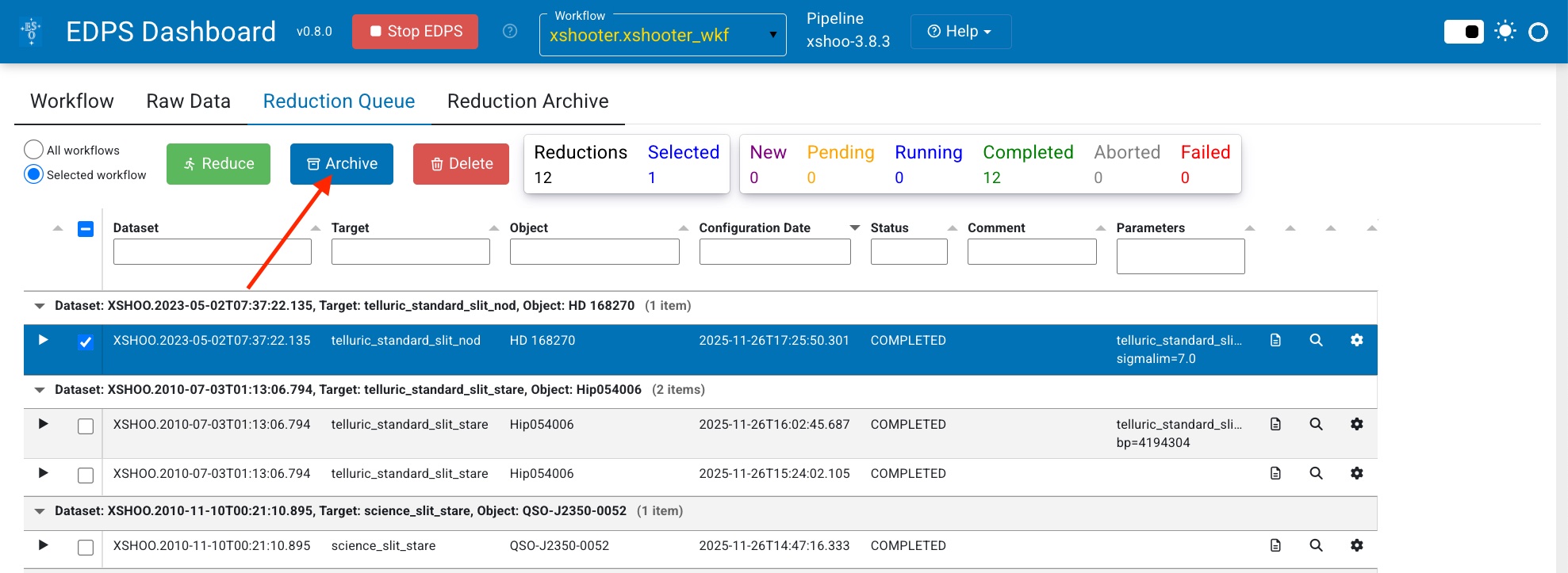
Go in the
Reduction Archivetab,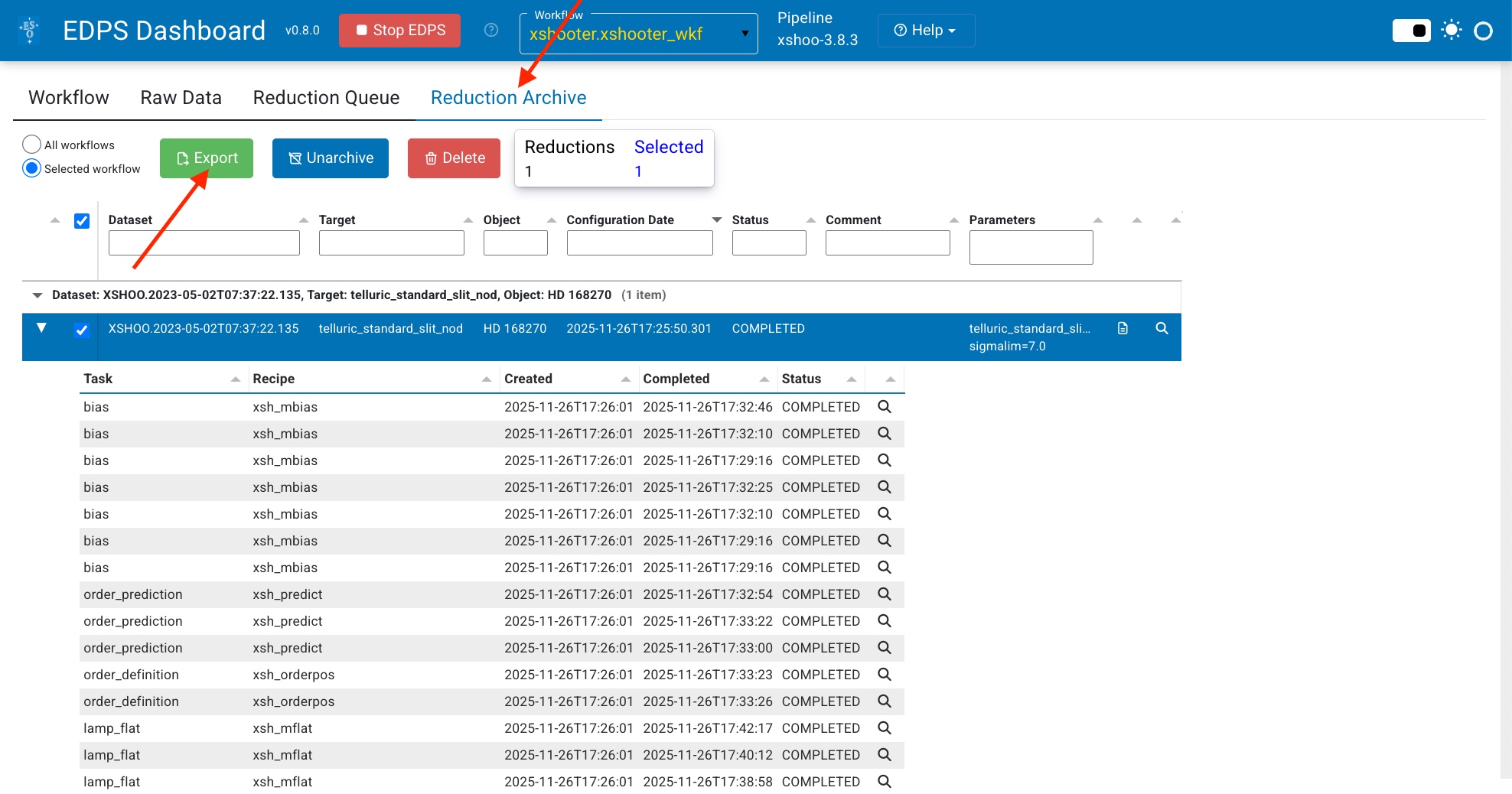
and click on the
Exportbutton. A new tab window appear where you can indicate the directory you want to copy your final products; finally press “Export” to copy the data.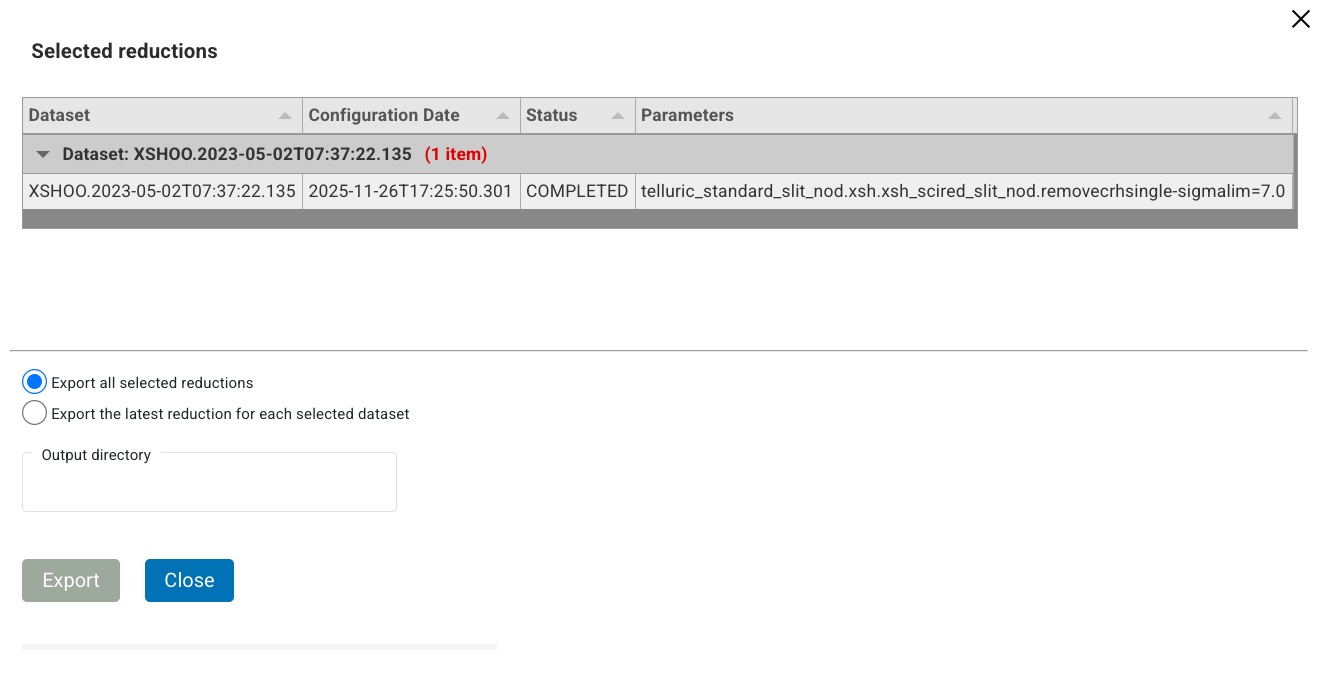
Q2) How do I stop the application?
Answer: Proceed as follows:
Press “Stop EDPS” in the Dashboard.
Type Ctrl-C in the terminal where the application is running. If the application doesn’t terminate, type Ctrl-C again.
Alternatively, kill the ‘panel serve’ process on your system, for example:
   ps -e | grep panel # get the process ID of the gui (<pid>).
   kill -9 <pid>
Q3) I have closed the browser window where the application is running. How can I reopen the application?
Answer: Point your browser to: http://localhost:5006/edps-gui
Q4) Where can I find some data that I can use to test the application?
Answer: Install the datademo package provided with the pipeline installation or download the “Demo Data” package
from href=https://www.eso.org/sci/software/pipe_aem_table.html.
Please note that the demo data can be large (tens of Gigabytes).
A convenient script to download demo data for any pipeline is also available and can be used from the command line:
curl -O https://eso.org/sci/software/apptainer/eso_download_demodata.sh
bash ./eso_download_demodata.sh
Q5) How can I start the edps-gui if the following message appears?:
Cannot start Bokeh server, port 5006 is already in use
Cannot start Bokeh server, port 5006 is already in use
Answer: The panel server was not closed properly. Kill it by typing:
ps -e | grep panel # get the process ID of the gui (<pid>).
kill -9 <pid>
Q6) How do I get additional support on EDPS or data reduction in general?
Answer: For suggestions, questions, or feedback in general, please open a ticket with the EDPS Support team. This link should take you directly to a webpage for creating and EDPS feedback ticket, but incase you want to navigate there ’manually’, go to https://support.eso.org, login, click on “Submit Helpdesk Ticket”, and specify the Help topic: “Post Observations”, “ESO Data Processing System [EDPS]”.
Q7) I have a lot of disk space, but when I install EDPS with pip or an ESO pipeline with `Homebrew` I get the error message: Cannot mkdir: No space left on device. How do I fix it?
Answer: This depends on how much disk space is allocated to the /home, /var, and /tmp directories. The final solution would be
to resize the space allocated to the in the organization of the filesystem. However, we list here few tricks that might do the job.
Clearing the pip .cache to make space for new packages. Type the command:
pip cache purge
before installing edps.
Redirect the cache, Homebrew temporary build directories into a partition with enough space. Set some of the following environmental variables in your .bashrc file:
export HOMEBREW_CACHE=<path_to_new_cache_directory>
export XDG_CACHE_HOME=<path_to_new_cache_directory>
export HOMEBREW_TEMP=<path_to_new_temporary_directory>
export TMPDIR=<path_to_new_temporary_directory>
The first moves only the location of Homebrew cache, the second the cache of most applications (instead of the default /home/username/.cache), the third moves the directory where homebrew builds, extracts, and saves temporary files (instead of the defaults /tmp and /var/tmp). The last changes the global system temporary directory and affects most of the linux commands.
As extreme measure, one can move the /home/linuxbrew/.linuxbrew directory somewhere else, and create a symbolic link in /home/linuxbrew. For example:
cd /home/linuxbrew
mv -f .linuxbrew <path_to_new_directory>
ln -s <path_to_new_directory> .linuxbrew
Important note: this operation migth break some internal links. Recipes requiring external packages such as telluriccorr might not work (impacts on kmos, xshooter, fors, and molecfit pipelines)
Q8) I have re-triggered the creation of datasets after having added a new directory in the input data dir. Some of the previously reduced datasets are labelled as new, despite the newly added files should have no impact. What's happening and how do I fix it?
Answer: This is a know bug that will be fixed in the next release. The cause is that the input data directory contains 2 files with the same properties and the same mjd-obs, but with different names (e.g. the same static calibration that is present in 2 places). Since their mjd-obs is the same, EDPS sometimes adds one file, sometimes the other. When a different file is associated, the dataset is labelled as new.
Go to XSHOOTER tutorial index